

Free Fire, every millisecond counts, and precision often determines victory or defeat. One of the most critical factors influencing gameplay is the sensitivity settings. Sensitivity settings in Free Fire control how quickly your character responds to your swipes and movements on the screen, affecting everything from aiming to shooting to navigating the battlefield.
Different players prefer different sensitivity levels, as it largely depends on individual reflexes, device type, and playing style. While low sensitivity may provide better control over long-range shots, higher sensitivity is ideal for close combat, fast movements, and quick turns.
Importance of Free Fire Sensitivity Settings
Sensitivity settings are not just a preference; they are a skill enhancer. Properly adjusted sensitivity allows players to:
- Improve Accuracy – Quick, precise aiming reduces missed shots.
- Enhance Reflexes – Fast camera movement helps respond to enemy attacks instantly.
- Reduce Recoil – Controlled shooting maintains aim even during continuous fire.
- Increase Survival Chances – Swift turns and movement make dodging bullets easier.
Gamers often experiment with different sensitivity levels to find the setup that suits their style. While some players thrive with lower sensitivity for precise sniper shots, others prefer higher sensitivity for aggressive gameplay.
How Free Fire Sensitivity Works
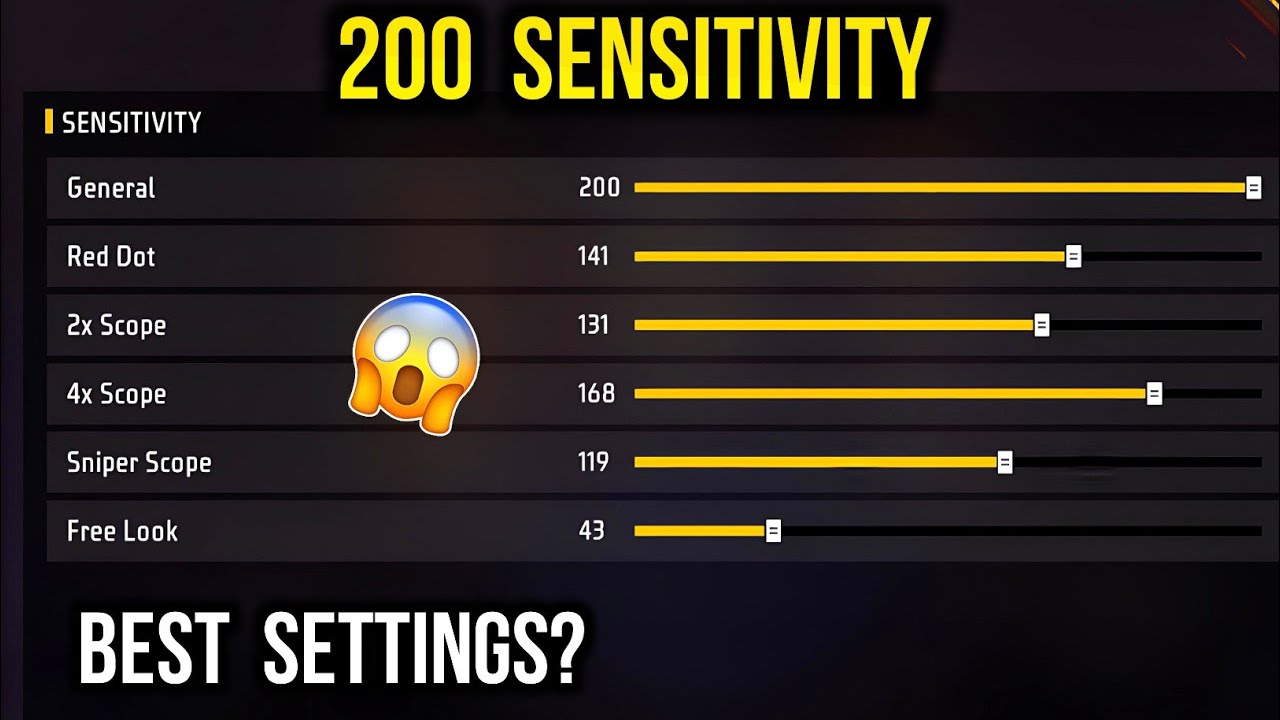
Free Fire separates sensitivity into multiple categories, allowing precise customization for different gameplay scenarios:
- General Sensitivity: Controls overall camera movement.
- Red Dot Sensitivity: Optimized for close-range aiming.
- 2x Scope Sensitivity: Best for medium-range combat.
- 4x Scope Sensitivity: Ideal for long-range engagements.
- Sniper Scope Sensitivity: Provides control for precise sniper shots.
- Free Look Sensitivity: Allows smooth movement without aiming.
Each category affects how your character reacts to screen gestures. Adjusting these individually ensures smoother gameplay tailored to your style.
Recommended Free Fire Sensitivity Settings
While personal preference matters, professional players often recommend a starting point for sensitivity optimization:
- General: 90–100
- Red Dot: 90–95
- 2x Scope: 85–90
- 4x Scope: 80–85
- Sniper Scope: 75–80
- Free Look: 90–100
These settings provide a balance between speed and control. Players should adjust gradually, testing performance in matches until the setup feels natural. Sensitivity settings should complement playing style, device screen, and hand movement comfort.
Tips for Optimizing Sensitivity Settings
- Test Regularly: Spend time in training ground testing new sensitivity levels.
- Adjust Gradually: Small increments help identify the perfect balance.
- Focus on Comfort: Settings should feel natural for longer gameplay sessions.
- Observe Recoil: Modify sensitivity to reduce vertical and horizontal recoil.
- Update with Game Versions: Free Fire updates may slightly affect sensitivity performance.
Consistency in training with your preferred sensitivity is key. Switching settings frequently may disrupt muscle memory and reduce accuracy.
Common Mistakes to Avoid
- Using Extreme Settings: Very high or low sensitivity may decrease control.
- Ignoring Device Differences: Screen size and refresh rate affect performance.
- Skipping Training: Practicing in the training area is essential to mastery.
- Copying Without Testing: Settings that work for pro players may not suit everyone.
Avoiding these mistakes ensures smoother gameplay and consistent performance.
Advanced Strategies for Sensitivity Mastery
- Customize Scope Settings Individually: Avoid using a uniform sensitivity across scopes.
- Match Style to Sensitivity: Aggressive players benefit from higher general and red dot sensitivity, while passive snipers may prefer lower settings for precision.
- Combine Sensitivity with HUD Layout: Positioning buttons and aiming zones improves reaction time.
- Monitor Performance: Record gameplay to observe how sensitivity affects aiming and shooting.
Pro players adjust sensitivity based on daily practice and personal gameplay evolution. Over time, these settings become an extension of muscle memory, making reactions instinctive.
Read Also: Comprehensive Guide to Free Fire Character Abilities
Free Fire Sensitivity Settings for Different Devices
Device type plays a significant role. Smartphones with larger screens require slightly higher sensitivity to cover more distance per swipe. Smaller devices need lower sensitivity to maintain control. Screen refresh rate also affects responsiveness devices with 90Hz or 120Hz can handle slightly higher sensitivity compared to standard 60Hz screens.
Optimizing Free Fire Sensitivity Settings for your device ensures consistent performance, avoiding jerky camera movement or overshooting targets.
Frequently Asked Questions
Should I use the same sensitivity for all scopes?
No. Different scopes (red dot, 2x, 4x, sniper) require different sensitivity levels for optimal control and accuracy.
Can sensitivity settings improve recoil control?
Yes. Proper sensitivity reduces vertical and horizontal recoil, allowing smoother continuous shooting.
How often should I change sensitivity settings?
Change settings only after thorough testing. Frequent adjustments can disrupt muscle memory and reduce performance.
Do device type and screen size affect sensitivity?
Yes. Larger screens may need higher sensitivity, while smaller screens benefit from lower sensitivity for better control.
What is the recommended general sensitivity for beginners?
For beginners, a general sensitivity of 90–100 is a good starting point, allowing smooth camera movement without losing control.
Can high sensitivity make aiming harder?
High sensitivity allows fast movement but may reduce precision. Balance speed and control for the best results.
How do pro players set their sensitivity?
Pro players customize each scope individually, test in training, adjust gradually, and match sensitivity to their playing style for maximum efficiency.
Conclusion
Mastering Free Fire Sensitivity Settings is essential for any serious player. The right sensitivity improves accuracy, reduces recoil, and enhances overall gameplay performance. While default settings may work initially, fine-tuning each category according to your style, device, and scope preferences makes a significant difference.
Experimenting with general, red dot, scope, sniper, and free look sensitivity while avoiding common mistakes ensures better control and higher chances of winning in every match.
